
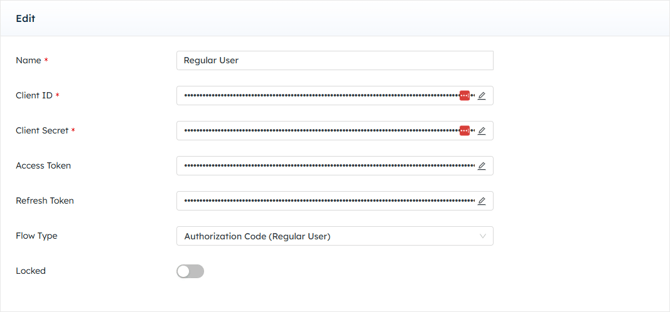
Sage Intacct REST - Regular User
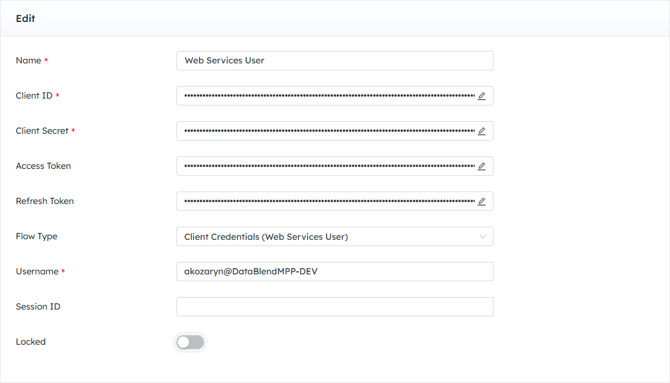
Sage Intacct REST - Web Services User
Users wishing to enable a Sage Intacct Rest to DataBlend connection MUST have an active Sage Intacct Web Services developer license, which includes a Web Services sender ID and password. This is needed to obtain the Client ID and Client Secret as required in the credential.
If DataBlend was purchased through Sage Data Flows, the Client ID and Client Secret required for the credential will be populated by DataBlend.
Configuration
| Field Name | Required/Optional | Description |
| Name | Required | Free-text. Provide a unique name for this credential. |
| Client ID | Required | Enter Client ID to access Intacct REST API. This is found within the Sage developer portal (see link further down in page for more information). |
| Client Secret | Required | Enter Client Secret Password to access Intacct REST API. This is found within the Sage developer portal (see link further down in page for more information). |
| Access Token | Not Applicable | Leave blank. Field will auto-fill upon successful connection. |
| Refresh Token | Not Applicable | Leave blank. Field will auto-fill upon successful connection. |
| Flow Type | Required | Select Regular User or Web Services User. |
| Username | Required | Only available and required for the Web Services User flow type. The format is username@companyID. |
| Session ID | Optional |
-png.png?width=492&height=318&name=Screenshot%20(1403)-png.png)
Creating a Web Services Application
-
Enable Web Services subscription: Go to Company → Admin → Subscriptions, scroll to Web Services, and toggle it On.
-
Authorize the client application: Go to Company → Setup → Company → Security tab → Edit, scroll down to Authorized Client Applications, click Add, and add your application as an authorized client.
-
Create a Web Services user: The client credentials flow requires a Web Services user with the appropriate permissions. This is the user whose
username@companyidyou'd enter in the Username field.
A note about creating an App within the Web Services Account: Sender Ids and Sender Passwords must remain the same across all apps created in the Web Services Account.
Please note, Client IDs and Client Secrets are case sensitive.
Security Note: Client IDs and Client Secrets are tied to the Sage Intacct Developer portal. This is sensitive information. Please do not unnecessarily share Client IDs and Client Secrets. This could create a vulnerability within the user's entire Sage Intacct account. Please practice secure and mindful password sharing within organizations.