
Types of Connection:
SOAP/Web Services Connection
SOAP/Web Services APIs are traditional, XML-based APIs with strict schemas. It is purpose-built for multi-step business processes, such as payroll runs, benefits enrollment, and financial reconciliation. This connection is the older but more comprehensive option for core HCM data.
-png.png?width=670&height=375&name=Screenshot%20(1397)-png.png)
SOAP Configuration
| Field Name | Required/Optional | Description |
| Name | Required | Provide a unique name for this credential. |
| Username | Required | Enter Workday username. |
| Password | Required | Enter Workday password. |
| Base URL | Required | Enter the associated URL. |
| Soap Version | Required |
Select the Workday Soap Version used. |
| Organization | Required | Enter the desired Workday Organization to collect and send data. |
REST Connection
REST APIs are modern and the default choice for real-time SaaS integrations. It uses JSON for high-frequency calls, such as syncing employee records, pulling dashboard data, and triggering notifications. The Workday REST API requires authentication through an OAuth 2.0 client setup, which means you must register a Workday API client. The ISU must also be assigned the required permissions.
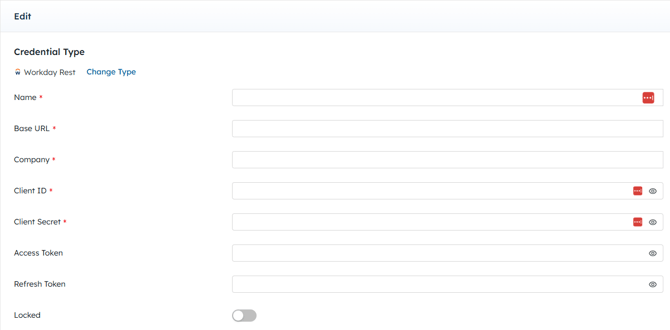
REST Configuration
| Field Name | Required/Optional | Description |
| Name | Required | Provide a unique name for this credential. |
| Base URL | Required | Enter the associated URL. |
| Company | Required | Enter the desired Workday Company to collect and send data. |
| Client ID | Required | Enter Client ID. |
| Client Secret | Required | Enter Client Secret. |
| Access Token | Not Applicable | Leave blank. This field will auto-populate when connected. |
| Refresh Token | Not Applicable | Leave blank. This field will auto-populate when connected. |
See Authenticate with OAuth for more information.